

Artificial intelligence has moved from a novelty to a daily companion. Whether you’re drafting an email, designing a logo, researching a topic, or building a startup, there’s a good chance an AI tool is quietly doing some of the heavy lifting. The challenge now isn’t finding AI—it’s knowing which tools actually deserve your time and money.
That’s exactly what this guide solves. Below, you’ll find a clear, honest breakdown of the top AI tools everyone should know in 2026, complete with real-world uses, benefits, limitations, and pricing. Whether you’re a student, a busy professional, an entrepreneur, a marketer, or a complete beginner, you’ll walk away knowing which tools fit your goals—and how to start using them without wasting hours on trial and error. Let’s get into it.
Why AI Tools Are More Important Than Ever in 2026
The pace of work has changed, and expectations have risen along with it. Clients want faster turnarounds, businesses want leaner teams, and individuals want more done in less time. AI tools have become the great equalizer, giving a solo freelancer access to capabilities that once required an entire department.
Three shifts make 2026 a turning point. First, AI has become genuinely multimodal—today’s leading models handle text, images, audio, and video in a single conversation. Second, agentic AI has arrived, meaning tools can now complete multi-step tasks on your behalf rather than just answering questions. Third, prices have dropped while free tiers have grown more generous, putting powerful technology within reach of nearly everyone.
The result is simple: people who learn these tools work faster, think bigger, and compete harder. Ignoring them isn’t a neutral choice anymore—it’s a competitive disadvantage.
Top AI Tools Everyone Should Know in 2026
Here’s a closer look at the ten tools shaping how we work, create, and learn this year.
ChatGPT
Overview: Developed by OpenAI, ChatGPT remains the most recognizable AI assistant on the planet, and for good reason. Running on GPT-5 and earlier models, it handles everything from casual questions to complex reasoning with remarkable fluency.
Key Features: Advanced voice conversations, image and document analysis, custom GPTs, agentic task completion, and a flexible range of plans including the budget-friendly ChatGPT Go tier.
Best Use Cases: Drafting emails, brainstorming ideas, summarizing documents, coding help, and learning new concepts through back-and-forth conversation.
Pros and Cons:
- Pros: Incredibly versatile, easy for beginners, strong free tier.
- Cons: Can occasionally produce confident but incorrect answers, so always verify important facts.
Google Gemini
Overview: Google’s Gemini was built to be natively multimodal from the ground up, and the Gemini 2.0 family thrives in what Google calls the “agentic era.”
Key Features: A massive context window that processes huge documents at once, deep integration with Gmail, Docs, and Android, and excellent reasoning across text, images, and video.
Best Use Cases: Researching long reports, working inside Google Workspace, analyzing large datasets, and managing tasks across Google’s ecosystem.
Pros and Cons:
- Pros: Seamless integration with Google products, huge context capacity.
- Cons: The best features sit behind a paid plan, and outputs can feel less creative than rivals.
Claude
Overview: Made by Anthropic, Claude has earned a loyal following among writers, researchers, and developers who value its thoughtful, nuanced responses.
Key Features: Artifacts for building documents and apps in real time, Projects for organizing work, standout coding ability through Claude Code, and a strong focus on safety.
Best Use Cases: Long-form writing, detailed analysis, coding projects, and tasks where accuracy and tone genuinely matter.
Pros and Cons:
- Pros: Exceptional writing quality, excellent at coding, handles nuance well.
- Cons: Smaller plugin ecosystem and fewer integrations than ChatGPT or Gemini.
Microsoft Copilot
Overview: Microsoft Copilot is AI woven directly into the tools millions already use every day—Windows 11 and Microsoft 365.
Key Features: Assistance inside Word, Excel, PowerPoint, and Outlook, Copilot Pages for collaborative work, and agentic workflows that automate repetitive office tasks.
Best Use Cases: Writing reports in Word, building spreadsheets in Excel, summarizing email threads, and creating presentations in minutes.
Pros and Cons:
- Pros: Unbeatable for Microsoft users, saves real time on office work.
- Cons: Less useful outside the Microsoft ecosystem; premium features require a subscription.
Perplexity AI
Overview: Think of Perplexity AI as a search engine and research assistant rolled into one. It answers questions with real-time information and cites its sources.
Key Features: Pro Search for deeper multi-source answers, Pages for turning research into shareable reports, file analysis, and clear citations on every response.
Best Use Cases: Research, fact-checking, market analysis, and any task where you need current information with sources you can trust.
Pros and Cons:
- Pros: Transparent citations, up-to-date answers, great for research.
- Cons: Less suited to long creative writing; advanced search has daily limits on the free plan.
Midjourney
Overview: Midjourney sets the standard for AI image generation. Its latest V8.1 model, released in April 2026 and made the default in June 2026, is its fastest and most photorealistic yet.
Key Features: Stunning, high-fidelity images, a redesigned web editor, fast generation speeds, and impressive control over style and detail.
Best Use Cases: Concept art, marketing visuals, social media graphics, mood boards, and product imagery.
Pros and Cons:
- Pros: Best-in-class image quality, intuitive web interface.
- Cons: No free tier, and getting precise results takes some practice with prompts.
Canva AI
Overview: Canva brought professional design to everyone, and its Magic Studio suite now packs serious AI into one of the friendliest platforms around.
Key Features: Magic Write for copy, image-to-video generation, Style Match for on-brand graphics, Magic Design, and one-click publishing to social platforms.
Best Use Cases: Social media posts, presentations, short videos, marketing materials, and quick branded designs—no design degree required.
Pros and Cons:
- Pros: Extremely beginner-friendly, generous free tier, all-in-one design hub.
- Cons: Templates can look generic if you don’t customize; the best AI features need Canva Pro.
Notion AI
Overview: Notion AI lives inside the popular workspace app, turning notes, docs, and databases into a connected, intelligent system.
Key Features: Autonomous Agents and Custom Agents that act on your behalf, instant Q&A across your entire workspace, writing assistance, and smart summarization.
Best Use Cases: Organizing projects, summarizing meeting notes, managing knowledge bases, and automating routine workflows within your team.
Pros and Cons:
- Pros: Deeply integrated with your existing notes, powerful for organization.
- Cons: There’s a learning curve to Notion itself, and AI features cost extra.
Grammarly AI
Overview: Long known as a grammar checker, Grammarly has grown into a full AI writing partner through GrammarlyGO.
Key Features: Context-aware rewriting, personalized tone profiles, strategic writing suggestions, and assistance that follows you across nearly every app and website.
Best Use Cases: Polishing emails, refining essays, improving business communication, and keeping a consistent tone across all your writing.
Pros and Cons:
- Pros: Works everywhere, excellent free tier, genuinely improves clarity.
- Cons: Advanced rewriting and tone tools require Premium.
Runway AI
Overview: Runway leads the charge in AI video generation, putting filmmaking power into the hands of solo creators. Its Gen-4 Turbo model is the standard for high-quality video in 2026.
Key Features: Text-to-video and image-to-video generation, strong temporal consistency between frames, and a growing suite of editing tools.
Best Use Cases: Short films, ad creative, social media video, and visual prototypes for creative projects.
Pros and Cons:
- Pros: Cutting-edge video quality, fast generation.
- Cons: Credits get used quickly, and longer clips can still show small inconsistencies.
AI Tools Comparison Table
| AI Tool | Primary Purpose | Best For | Pricing Model |
| ChatGPT | All-purpose AI assistant | Everyone, beginners | Free + Paid (Go/Plus) |
| Google Gemini | Multimodal assistant & research | Google Workspace users | Free + Paid |
| Claude | Writing, analysis & coding | Writers, developers | Free + Paid |
| Microsoft Copilot | Office productivity | Microsoft 365 users | Free + Paid |
| Perplexity AI | AI-powered research | Researchers, students | Free + Paid |
| Midjourney | Image generation | Designers, marketers | Paid only |
| Canva AI | Design & content creation | Beginners, marketers | Free + Paid |
| Notion AI | Workspace & productivity | Teams, organizers | Paid add-on |
| Grammarly AI | Writing improvement | Students, professionals | Free + Paid |
| Runway AI | Video generation | Content creators | Free credits + Paid |
Best AI Tools for Students
Students benefit most from tools that explain, research, and refine. ChatGPT is a patient study partner that breaks down tricky concepts, while Perplexity AI delivers cited answers that make essay research faster and more reliable. Grammarly then polishes the final draft for clarity and tone.
A practical tip: use these tools to understand, not to replace your own thinking. Ask AI to explain why an answer works, then try the next problem yourself. The goal is to learn faster—not to skip learning altogether.
Best AI Tools for Businesses
For businesses, AI is about efficiency and scale. Microsoft Copilot and Notion AI streamline daily operations, from reports to project management. ChatGPT and Claude support customer communication, strategy, and content, while Canva AI keeps marketing materials looking professional without a big design budget.
The smartest move for any business is to start with one workflow—say, summarizing meetings or drafting proposals—prove the time savings, then expand from there.
Best AI Tools for Content Creators
Creators are spoiled for choice in 2026. Midjourney generates eye-catching visuals, Runway AI brings video ideas to life, and Canva AI ties everything together for social media. For the words, ChatGPT and Claude handle scripts, captions, and blog posts with ease.
A simple workflow that works: brainstorm with ChatGPT, create visuals in Midjourney, produce video with Runway, and assemble the final piece in Canva.
How to Choose the Right AI Tool
With so many options, the best approach is to start with your goal, not the tool. Ask yourself what you actually need: better writing, faster research, eye-catching design, or smoother operations? Match the task to the tool, and the choice becomes obvious.
A few practical pointers:
- Always try the free version first. Most top tools offer one, so you can test before you pay.
- Don’t subscribe to everything. Pick two or three that cover your core needs.
- Check integrations. A tool that connects to apps you already use saves the most time.
- Read the privacy terms if you’re handling sensitive or business data.
Common Mistakes People Make When Using AI
Even great tools get misused. The most common mistake is trusting AI blindly—these models can sound certain while being wrong, so verification matters. Another is writing vague prompts; the clearer your instructions, the better your results.
Many people also jump between too many tools, never mastering any of them. And finally, some treat AI as a complete replacement for their own judgment rather than a partner. The best results come when you stay in control and let AI do the supporting work.
The Future of AI Tools Beyond 2026
The clearest trend ahead is agentic AI—tools that don’t just respond but actually carry out multi-step tasks, from booking travel to managing entire projects. Expect deeper integration across apps, so your tools talk to each other automatically.
We’ll also see more personalization, with AI that learns your style and preferences over time, and better multimodal abilities that blend text, voice, image, and video effortlessly. The tools on this list are evolving fast, and the people who learn the fundamentals now will adapt easily to whatever comes next.
Frequently Asked Questions
1. What are the top AI tools everyone should know in 2026?
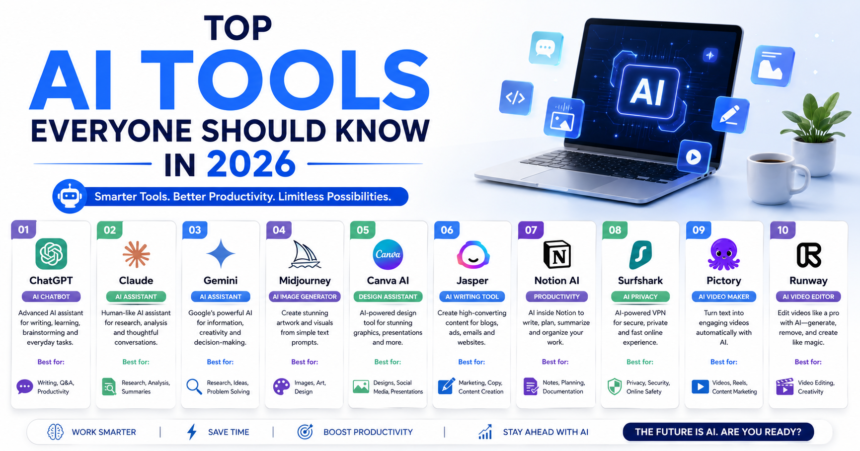
The standouts are ChatGPT, Google Gemini, Claude, Microsoft Copilot, Perplexity AI, Midjourney, Canva AI, Notion AI, Grammarly AI, and Runway AI—covering writing, research, design, video, and productivity.
2. Are there free AI tools worth using?
Absolutely. ChatGPT, Gemini, Claude, Perplexity, Canva, and Grammarly all offer strong free tiers that are more than enough for most everyday tasks.
3. Which AI tool is best for beginners?
ChatGPT is the easiest entry point, and Canva AI is ideal for beginners who want to create designs without any prior experience.
4. Can AI tools replace human jobs?
AI is better thought of as a partner than a replacement. It handles repetitive tasks so you can focus on creativity, strategy, and judgment—skills that still need a human.
5. Are AI tools safe to use with private data?
Many offer encryption and privacy controls, but you should always review each tool’s data policy before sharing sensitive or confidential information.
6. How many AI tools should I actually use?
Two or three that cover your main needs is plenty. Mastering a few tools beats juggling a dozen you barely understand.
7. Do I need to pay to get good results?
Not necessarily. Free tiers handle most tasks well, though paid plans unlock advanced features that benefit heavy or professional users.
Final Thoughts
The AI landscape of 2026 offers something genuinely valuable for everyone—students who want to learn faster, professionals who want to save hours, businesses chasing efficiency, and creators bringing bold ideas to life. The top AI tools everyone should know in 2026 aren’t about replacing your skills; they’re about amplifying them.
The best way to understand these tools is to use them. Pick one that matches a task you’re working on this week, try the free version, and experiment with a few prompts. You’ll be surprised how quickly it becomes part of your routine. Start small, stay curious, and keep your own thinking at the center—because the people who pair human judgment with smart tools are the ones who will thrive in the years ahead.